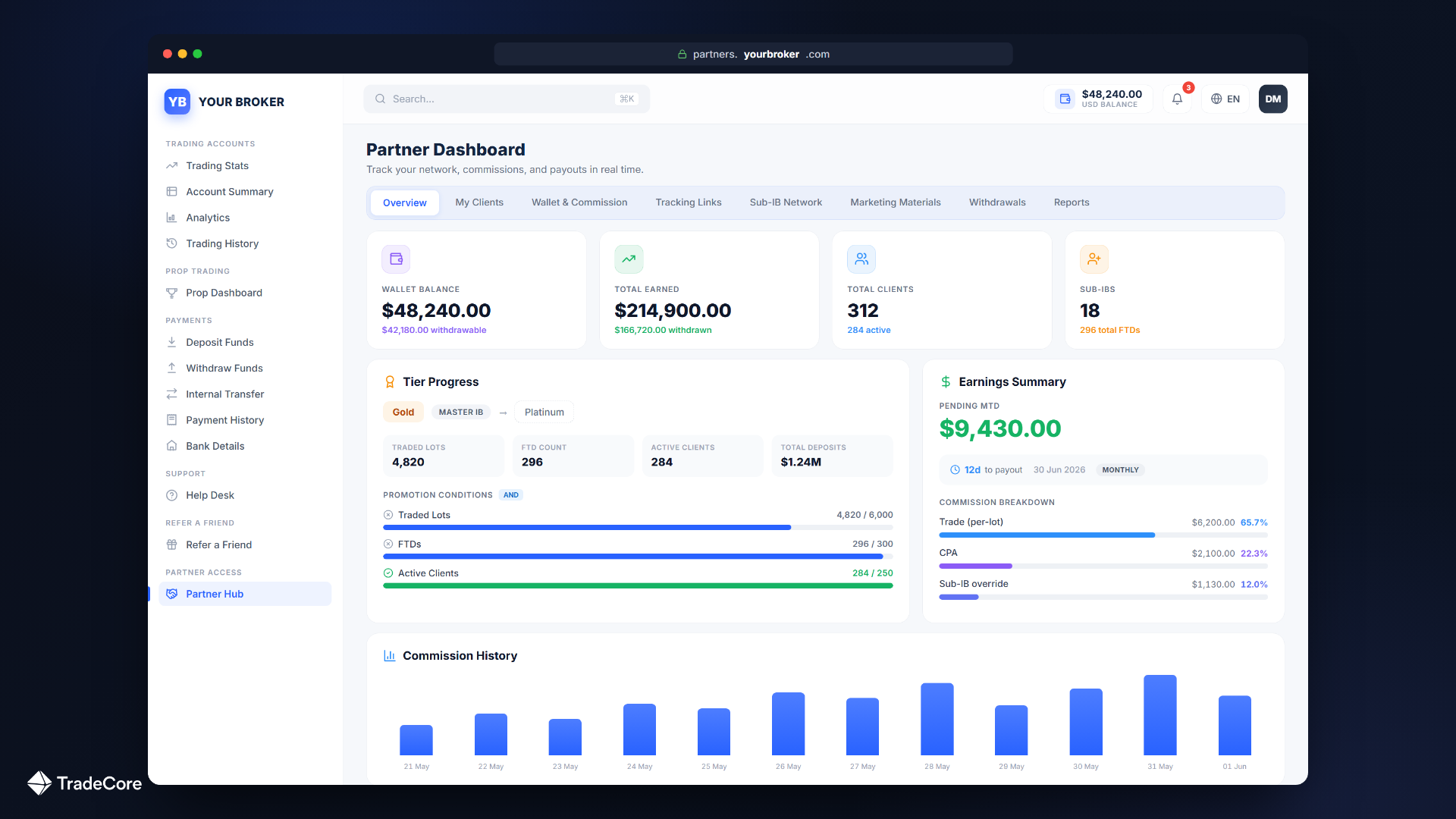
The BrokerIQ Partner Hub is a fully white-label self-service portal where your IBs and affiliates complete eight everyday actions, from checking their commission balance to requesting a withdrawal, without filing a support ticket. BrokerIQ is TradeCore's unified CRM and back-office platform for forex/CFD brokers. Unlike a vendor-branded portal, the BrokerIQ Partner Hub runs on the broker's own logo, colors, and custom domain, so partners only ever see your brand, not the CRM vendor's.
Every IB program produces a predictable pattern of tickets. The partner wants to know what their commission balance is. The partner wants a tracking link for a new Facebook campaign. The partner wants to add a sub-IB and set a split percentage. The partner wants to withdraw their accumulated commissions. The partner wants the network tree because a new sub-affiliate is asking who reports to whom. Multiply by however many active partners the broker has, and the ops team spends a non-trivial share of its week answering the same questions through email and Slack.
The Partner Hub is the BrokerIQ-side answer to that pattern: a fully white-label self-service portal where partners do those eight actions themselves, without filing a ticket. This post is the tour. Every action below is something a partner can complete inside the Hub without involving your ops team, and every screen the partner sees is your brand on your custom domain.
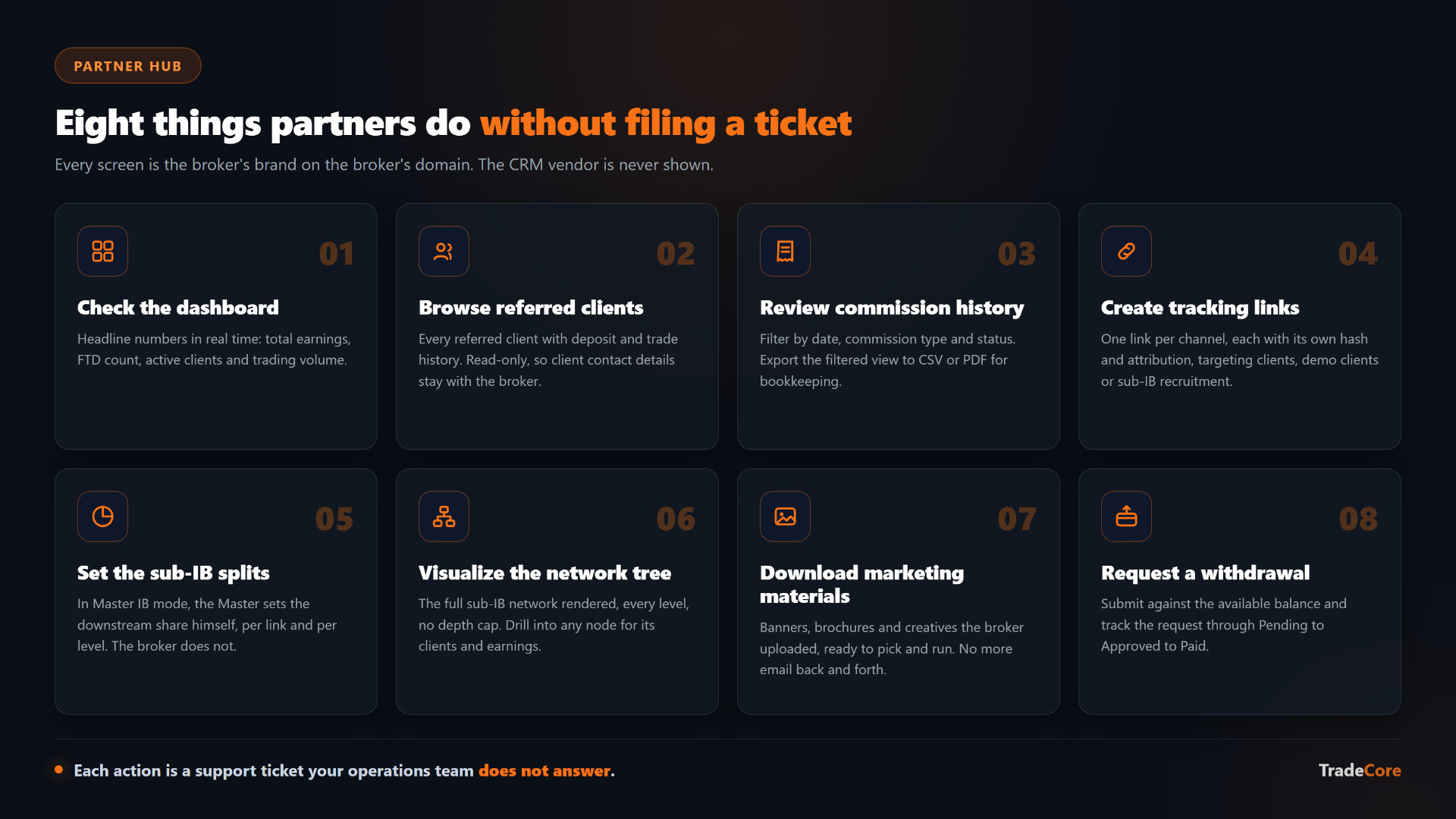
Illustrative overview of the eight self-service actions described in this tour. Abstract mockup, not a screenshot of the live BrokerIQ product.
The argument before the tour: your brand, not someone else's
Most forex CRMs in the category get the partner portal question wrong in one of two ways. Either they skip it entirely (the partner has no portal, every question becomes a ticket, the operating cost of the IB program scales linearly with partner count), or they ship a portal that is branded by the vendor (the partner logs into someone-else.com to check the commissions they earned by referring traders to your brokerage, which is a brand leak no broker should accept).
The BrokerIQ Partner Hub is fully white-label. The broker's logo. The broker's color scheme. The broker's custom domain (for example, partners.yourbrokerage.com). The partner's first impression and every subsequent visit is your brand. The partner never sees the CRM vendor's name in the URL, in the header, in the footer, in the email notifications, or in the downloadable reports.
That is the argument under the eight features below. Each one is a piece of operating depth. All eight together are the difference between a partner portal that runs the channel and a partner portal that asks the channel to wait for ops.
1. The dashboard: the partner's headline numbers in real time
The Hub opens on a single dashboard, the partner's landing view on every visit. It reads live from the same back office that runs the broker's CRM, so the numbers the partner sees and the numbers the broker's ops team sees are the same data, with no separate database and no delayed sync.
The dashboard surfaces the partner's headline performance at a glance: total earnings, first-time-depositor (FTD) count, active clients, and trading volume. Deeper per-partner figures, including payout totals, live in the reports views covered later in this tour.
Without this surface, every one of those numbers is a separate ticket to the broker's ops team. With it, the partner answers their own first question every time they log in.
2. Browse every referred client with deposit and trade history
The Hub shows the partner a list of every client they have referred, with the data they need to evaluate the network: deposit history per client, trade history per client, and account status. The partner can drill into any single client to see the full activity timeline that their commissions were calculated against. The view is read-only on the partner side (the partner does not see client contact details, only activity metrics), which preserves the broker's relationship with the client.
Why this matters: a partner running an active acquisition channel needs to know which campaigns produced which deposits and which trading activity. A partner without this view either asks ops for a CSV every month or operates on faith. The Hub view replaces both patterns with a self-service surface.
3. Commission history filterable by date, type, and status
Every commission record the system has produced for the partner is in the Hub, filterable by date range, commission type (per-lot, CPA, prop-challenge, hybrid), and status (pending, approved, paid, on hold). The partner can export the filtered view as CSV or PDF for their own bookkeeping. Records reconcile against the broker's BrokerIQ commission ledger, so the numbers in the partner's export and the numbers in the broker's back office are the same.
Note 1: a partner whose commission history is opaque generates ticket volume out of mistrust as much as out of curiosity. A partner whose commission history is visible and filterable trusts the broker. Trust is a retention metric.
4. Create and manage their own tracking links, one per channel
The Hub lets the partner create the tracking links they need, one per channel, each with its own 12-character hash identifier (the link slug), its own attribution, and, where the broker allows it, its own commission rule. A partner can run a higher per-lot link for a high-effort YouTube channel and a lower per-lot link for a low-effort banner campaign, all under the same partner record. Each link can target a live client, a demo client, or sub-IB recruitment.
Each link's click metadata (IP, country, device type, browser, and operating system, aggregated daily) is tracked, so the partner sees channel-level performance and the broker sees the same data on the back-office side. The partner controls the link configuration from the Hub; the broker controls which configurations are allowed through the BrokerIQ commission engine settings.
5. Manage the sub-IB network: the Master IB sets the splits
For Master IBs running multi-level networks, the Hub provides the sub-IB management surface that most partner portals in the category skip, and it does something most of them cannot: it lets the Master IB set the commission splits himself.
BrokerIQ supports unlimited IB tier depth in two distribution modes:
- Master IB mode: the Master IB's rule generates all the commission, and the Master IB then sets how that commission splits across the levels beneath him, configuring the share percentages per tracking link and per level directly from the Hub. The broker does not set those splits. The Master controls the downstream distribution, and the splits configured in the Hub are the splits that fire when commissions calculate.
- Broker mode: the broker pays each level independently from its own rules, and the parent IB earns an override commission on top. In this mode the Hub shows the network without granting the Master split control.
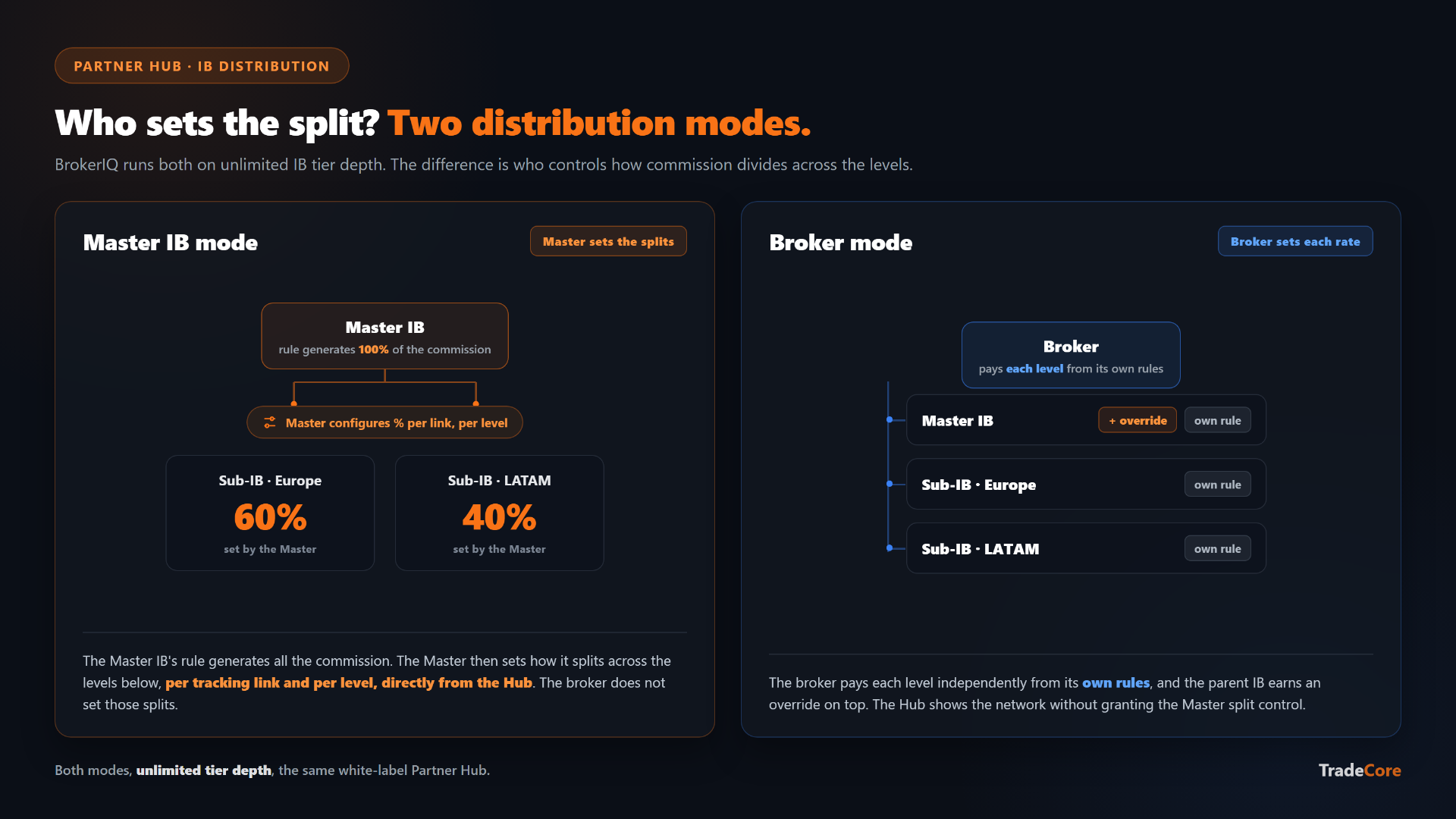
Illustrative concept of Master IB mode versus Broker mode. Abstract mockup, not a screenshot of the live BrokerIQ product.
So a Master IB running two regional sub-IBs who each run three sub-sub-IBs configures the entire split structure himself, per link and per level, without involving the broker's ops team.
6. Visualize the full network tree, every level rendered
The Hub renders the partner's full sub-IB network as a visual tree. Every level. No depth cap. A Master IB with three sub-IBs who each have six sub-sub-IBs sees a tree with three top-level branches, six leaves under each, and the option to drill into any node to see that sub-IB's clients, volume, and earnings.
The visualization matters for the obvious reason (a Master IB cannot manage what they cannot see), and for a less obvious one: regional partner networks are often introduced to the broker as flat lists in a spreadsheet, and the tree view is the first time both the partner and the broker see the actual shape of the network they are running. That shape almost never matches the spreadsheet.
7. Download marketing materials the broker has uploaded
The broker uploads creative assets (banners, brochures, and other creatives) into the BrokerIQ back office. The Hub surfaces those assets to the partner with a simple download interface. The partner picks the asset, downloads it, and runs it.
Without this surface, every new campaign request is an email exchange ("can you send me the latest brochure in Spanish?", "do you have a Facebook-sized banner for the new product?"). With it, the partner pulls what they need and runs.
8. Request a withdrawal of accumulated commissions
The Hub closes the loop with the action partners care about most: the withdrawal request. The partner sees their available balance (filtered through the partner qualification rules the broker has configured, so partners who do not yet meet the minimum FTD count or minimum deposit threshold see a clear status rather than a frustrating rejection on submit), submits a withdrawal request, and tracks the request through the approval workflow.
On the broker's side, the request enters the Pending to Approved to Paid workflow in BrokerIQ's partner wallet management. Ops approve or reject per-partner per-cycle, with the option to freeze a single partner's wallet without delaying any other partner's payout (the partner's commissions continue to accumulate while the wallet is frozen). The partner sees the status update in the Hub as the broker's ops moves the request through the workflow.
The economics: every action above is a ticket your ops does not answer
Each of the eight actions above is a ticket that, on a CRM without a self-service partner portal, the broker's operations team has to answer. The economics are linear: the more a partner can self-serve, the more partners a single ops headcount can support. A broker with a hundred active partners and a Hub that handles all eight actions runs the channel with materially less operations cost than a broker with a hundred active partners and a partner portal that handles three of the eight (or none of them).
| Partner action | In the Partner Hub (self-service) | Without a Hub |
|---|---|---|
| Check headline numbers | Earnings, FTD count, active clients and trading volume, live on the dashboard at every login | A separate ticket to ops for each number |
| Review referred clients | Read-only list with deposit and trade history; drill into any client's activity timeline | Ask ops for a CSV every month, or operate on faith |
| Reconcile commissions | Filter by date, type and status; export CSV or PDF | Tickets raised out of mistrust and curiosity |
| Create tracking links | Self-serve, one per channel, own attribution and (where allowed) own commission rule | Request a new link from ops for each campaign |
| Manage the sub-IB network | Master IB sets the share percentages per link and per level himself | Add a sub-IB and set a split through ops |
| See the network shape | Full visual tree, every level, drill into any node | A ticket, or a flat spreadsheet that rarely matches reality |
| Get marketing creatives | Self-serve download of the assets the broker uploaded | An email exchange per asset |
| Withdraw commissions | Submit and track a withdrawal request against the available balance | A ticket to request the payout |
Check headline numbers
- In the Partner Hub (self-service)
- Earnings, FTD count, active clients and trading volume, live on the dashboard at every login
- Without a Hub
- A separate ticket to ops for each number
Review referred clients
- In the Partner Hub (self-service)
- Read-only list with deposit and trade history; drill into any client's activity timeline
- Without a Hub
- Ask ops for a CSV every month, or operate on faith
Reconcile commissions
- In the Partner Hub (self-service)
- Filter by date, type and status; export CSV or PDF
- Without a Hub
- Tickets raised out of mistrust and curiosity
Create tracking links
- In the Partner Hub (self-service)
- Self-serve, one per channel, own attribution and (where allowed) own commission rule
- Without a Hub
- Request a new link from ops for each campaign
Manage the sub-IB network
- In the Partner Hub (self-service)
- Master IB sets the share percentages per link and per level himself
- Without a Hub
- Add a sub-IB and set a split through ops
See the network shape
- In the Partner Hub (self-service)
- Full visual tree, every level, drill into any node
- Without a Hub
- A ticket, or a flat spreadsheet that rarely matches reality
Get marketing creatives
- In the Partner Hub (self-service)
- Self-serve download of the assets the broker uploaded
- Without a Hub
- An email exchange per asset
Withdraw commissions
- In the Partner Hub (self-service)
- Submit and track a withdrawal request against the available balance
- Without a Hub
- A ticket to request the payout
That linear capacity gain is the actual operating argument for a Partner Hub. The white-label branding is the brand argument. Both are real, and both are why the Hub is the surface most brokers ask about first when they evaluate the BrokerIQ IB module.
What is in the Hub that this tour did not cover
The eight actions above are the most-used. The Hub also includes scheduled report generation (daily, weekly, or monthly partner performance reports, in CSV or PDF, retained for 90 days), per-tracking-link click funnels with geographic breakdown and device stats, and partner-side visibility into tier promotion or demotion (when the broker runs tier programs with promotion conditions, retention thresholds, and grace periods through the BrokerIQ tier engine). For the full eight-feature differentiator argument on the IB module beyond the Hub itself, see Eight IB-System Features Most Forex CRMs Do Not Have.
How to evaluate a partner portal at a vendor meeting
Three questions for any vendor demoing a partner portal:
- Whose brand is on it? Open the portal in a browser. The logo, the color scheme, the URL, the footer, the email notifications, the downloadable reports. If any of them carry the CRM vendor's name, it is not white-label, regardless of how the vendor describes it.
- What is the eight-action list? The eight actions above are the surface partners use day to day. Walk through each one in the demo. The vendor who handles all eight has a partner portal that runs the channel; the vendor who handles three of them has a partner portal that asks the channel to wait for ops.
- How does it connect to the back office? The numbers a partner sees in the portal and the numbers ops sees in the back office should be the same data, in real time. A portal that runs against a separate database or a delayed sync is a portal that produces reconciliation tickets.
See the Partner Hub against your own network
The Hub is best judged against a real partner network, not a generic demo. Book a 20-minute walkthrough and we run the eight actions above against your own program shape: your tiers, your commission rules, your split structure, your withdrawal workflow.
Book a demo at tradecore.com/contact, see the broader IB-module differentiator framework in Eight IB-System Features Most Forex CRMs Do Not Have, or check pricing. If you are attending iFX EXPO Cyprus this June (16 to 18 June, Limassol, Booth 83), you can walk through the same Partner Hub demo live at our booth.
Frequently asked questions
Tags
Ready to Get Started?
Discover how TradeCore can help you build and scale your forex brokerage with our comprehensive CRM.